Asset Tag Printing
Print QR code and barcode asset tags from Device42 using a compatible label printer.
Supported Printers
Device42 supports the Brother QL700 label printer. Any label printer that can print at 300x600 dpi should work (300x300 dpi may result in lower quality).
Recommended labels:
- QR Codes: Brother DK-2211 (50' roll, 1-1/7" width, black on white)
- Barcodes: Brother DK-2212 (50' roll, 2.42" width, black on white)
These products are available in the US from online and in store merchants including Amazon and Staples. We would love to hear feedback from international customers' and their experience.
Device42 does not provide support for third-party printer issues. Contact the printer manufacturer for troubleshooting.
Printer Configuration
Install the printer driver following the manufacturer's instructions. No additional software is required.
QR Codes

Configure the following settings for QR code labels:
| Setting | Value |
|---|---|
| Paper Size | 1.1" |
| Length | 3.4" |
| Orientation | Landscape |
| Option | Cut at end of each label (recommended) |
Barcodes
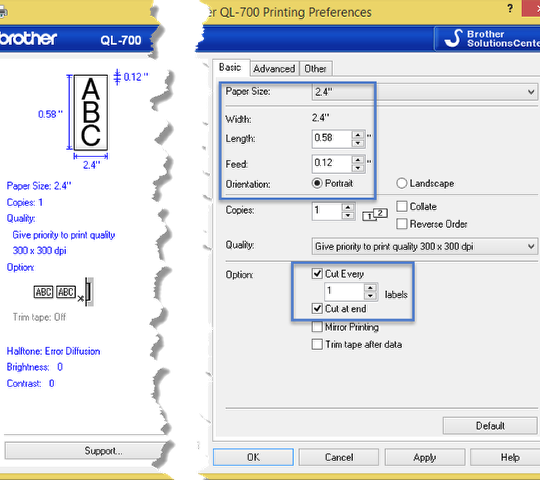
Configure the following settings for barcode labels:
| Setting | Value |
|---|---|
| Paper Size | 2.4" (62mm) |
| Length | 0.58" (14.7mm) |
| Feed | 0.12" (3mm) minimum |
| Orientation | Portrait |
| Quality | 300x300 |
| Option | Cut at end of each label (recommended) |
Supported Browsers
Firefox and Edge are supported for asset tag printing. Chrome historically hasn't handled margins well for small print sizes, but this may have changed since testing.